Search This Blog

ict

ict

Friday, August 12, 2016

OUTPUT DEVICES

Following are few of the important output devices which are used in a computer.


  1. Monitors
  2. Graphic Plotter
  3. Printer

Monitors

Monitors, commonly called as Visual Display Unit (VDU), are the main output device of a computer. It forms images from tiny dots, called pixels that are arranged in a rectangular form. The sharpness of the image depends upon the number of pixels.

There are two kinds of viewing screen used for monitors.


  • Cathode-Ray Tube (CRT)
  • Flat- Panel Display

Cathode-Ray Tube (CRT) Monitor

The CRT display is made up of small picture elements called pixels. The smaller the pixels, the better the image clarity, or resolution. It takes more than one illuminated pixel to form whole character, such as the letter ‘e’ in the word help.

A finite number of characters can be displayed on a screen at once. The screen can be divided into a series of character boxes - fixed location on the screen where a standard character can be placed. Most screens are capable of displaying 80 characters of data horizontally and 25 lines vertically.

 There are some disadvantages of CRT:


  1. Large in Size
  2. High power consumption


Flat-Panel Display Monitor

The flat-panel display refers to a class of video devices that have reduced volume, weight and power requirement in comparison to the CRT. You can hang them on walls or wear them on your wrists. Current uses of flat-panel displays include calculators, video games, monitors, laptop computer, graphics display.

The flat-panel display is divided into two categories:

Emissive Displays - The emissive displays are devices that convert electrical energy into light. Example are plasma panel and LED(Light-Emitting Diodes).

Non-Emissive Displays - The Non-emissive displays use optical effects to convert sunlight or light from some other source into graphics patterns. Example is LCD(Liquid-Crystal Device)

Flat Monitor


Printers

Printer is an output device, which is used to print information on paper.

There are two types of printers:


  • Impact Printers
  • Non-Impact Printers

Impact Printers

The impact printers print the characters by striking them on the ribbon which is then pressed on the paper.

Characteristics of Impact Printers are the following:


  • Very low consumable costs
  • Very noisy
  • Useful for bulk printing due to low cost
  • There is physical contact with the paper to produce an image
These printers are of two types


  1. Character printers
  2. Line printers

Character Printers

Character printers are the printers which print one character at a time.

These are further divided into two types:


  1. Dot Matrix Printer(DMP)
  2. Daisy Wheel

DOT MATRIX PRINTER

In the market one of the most popular printers is Dot Matrix Printer. These printers are popular because of their ease of printing and economical price. Each character printed is in form of pattern of dots and head consists of a Matrix of Pins of size (5*7, 7*9, 9*7 or 9*9) which come out to form a character that is why it is called Dot Matrix Printer.

Advantages


  • Inexpensive
  • Widely Used
  • Other language characters can be printed
Disadvantages


  • Slow Speed
  • Poor Quality


DAISY WHEEL

Head is lying on a wheel and pins corresponding to characters are like petals of Daisy (flower name) that is why it is called Daisy Wheel Printer. These printers are generally used for word-processing in offices which require a few letters to be sent here and there with very nice quality.

Advantages


  • More reliable than DMP
  • Better quality
  • The fonts of character can be easily changed

Disadvantages


  • Slower than DMP
  • Noisy
  • More expensive than DMP


Line Printers

Line printers are the printers which print one line at a time.


These are of further two types


  • Drum Printer
  • Chain Printer

DRUM PRINTER

This printer is like a drum in shape so it is called drum printer. The surface of drum is divided into number of tracks. Total tracks are equal to size of paper i.e. for a paper width of 132 characters, drum will have 132 tracks. A character set is embossed on track. The different character sets available in the market are 48 character set, 64 and 96 characters set. One rotation of drum prints one line. Drum printers are fast in speed and can print 300 to 2000 lines per minute.

Advantages


  • Very high speed
Disadvantages


  • Very expensive
  • Characters fonts cannot be changed

CHAIN PRINTER

In this printer, chain of character sets are used so it is called Chain Printer. A standard character set may have 48, 64, or 96 characters.

Advantages


  • Character fonts can easily be changed.
  • Different languages can be used with the same printer.

Disadvantages


  • Noisy

Non-impact Printers

Non-impact printers print the characters without using ribbon. These printers print a complete page at a time so they are also called as Page Printers.

These printers are of two types


  1. Laser Printers
  2. Inkjet Printers

Characteristics of Non-impact Printers

  • Faster than impact printers.
  • They are not noisy.
  • High quality.
  • Support many fonts and different character size.

Laser Printers

These are non-impact page printers. They use laser lights to produce the dots needed to form the characters to be printed on a page.

ADVANTAGES

  • Very high speed
  • Very high quality output
  • Give good graphics quality
  • Support many fonts and different character size

DISADVANTAGES

  • Expensive.


Cannot be used to produce multiple copies of a document in a single printing.


Inkjet Printers

Inkjet printers are non-impact character printers based on a relatively new technology. They print characters by spraying small drops of ink onto paper. Inkjet printers produce high quality output with presentable features.

They make less noise because no hammering is done and these have many styles of printing modes available. Colour printing is also possible. Some models of Inkjet printers can produce multiple copies of printing also.

ADVANTAGES

  • High quality printing
  • More reliable

DISADVANTAGES

  • Expensive as cost per page is high
  • Slow as compared to laser printer


Thursday, August 11, 2016

Transmission Modes in Computer Networks

Transmission mode means transferring of data between two devices. It is also called communication mode. These modes direct the direction of flow of information. There are three types of transmission mode. They are :
  • Simplex Mode
  • Half duplex Mode
  • Full duplex Mode


SIMPLEX Mode

In this type of transmission mode data can be sent only through one direction i.e. communication is unidirectional. We cannot send a message back to the sender. Unidirectional communication is done in Simplex Systems.
Examples of simplex Mode is loudspeaker, television broadcasting, television and remote, keyboard and monitor etc.


HALF DUPLEX Mode

In half duplex system we can send data in both directions but it is done one at a time that is when the sender is sending the data then at that time we can’t send the sender our message. The data is sent in one direction.
Example of half duplex is a walkie- talkie in which message is sent one at a time and messages are sent in both the directions.


FULL DUPLEX Mode

In full duplex system we can send data in both directions as it is bidirectional. Data can be sent in both directions simultaneously. We can send as well as we receive the data.
Example of Full Duplex is a Telephone Network in which there is communication between two persons by a telephone line, through which both can talk and listen at the same time.

In full duplex system there can be two lines one for sending the data and the other for receiving data.


Multiplexing

What does Multiplexing Means?


Multiplexing is a popular networking technique that integrates multiple analog and digital signals into a signal transmitted over a shared medium. Multiplexers and de-multiplexers are used to convert multiple signals into one signal.


This term is also known as muxing.


Types
  • Frequency Division Multiplexing
  • Time Division Multiplexing
  • Code Division Multiplexing

Frequency Division Multiplexing


Frequency-division multiplexing (FDM) is inherently an analog technology. FDM achieves the combining of several signals into one medium by sending signals in several distinct frequency ranges over a single medium.

One of the most common applications for FDM is traditional radio and television broadcasting from terrestrial, mobile or satellite stations, or cable television. Only one cable reaches a customer's residential area, but the service provider can send multiple television channels or signals simultaneously over that cable to all subscribers without interference. Receivers must tune to the appropriate frequency (channel) to access the desired signal.


Time Division Multiplexing


Time-division multiplexing (TDM) is a digital (or in rare cases, analog) technology which uses time, instead of space or frequency, to separate the different data streams. TDM involves sequencing groups of a few bits or bytes from each individual input stream, one after the other, and in such a way that they can be associated with the appropriate receiver. If done sufficiently quickly, the receiving devices will not detect that some of the circuit time was used to serve another logical communication path.


Code Division Multiplexing


Code division multiplexing (CDM), Code division multiple access (CDMA) or spread spectrum is a class of techniques where several channels simultaneously share the same frequency spectrum, and this spectral bandwidth is much higher than the bit rate or symbol rate. One form is frequency hopping, another is direct sequence spread spectrum. In the latter case, each channel transmits its bits as a coded channel-specific sequence of pulses called chips. Number of chips per bit, or chips per symbol, is the spreading factor. This coded transmission typically is accomplished by transmitting a unique time-dependent series of short pulses, which are placed within chip times within the larger bit time. All channels, each with a different code, can be transmitted on the same fiber or radio channel or other medium, and asynchronously demultiplexed. Advantages over conventional techniques are that variable bandwidth is possible (just as in statistical multiplexing), that the wide bandwidth allows poor signal-to-noise ratio according to Shannon-Hartley theorem, and that multi-path propagation in wireless communication can be combated by rake receivers.


binary number

In mathematics and digital electronics, a binary number is a number expressed in the binary numeral system or base-2 numeral system which represents numeric values using two different symbols: typically 0 (zero) and 1 (one). The base-2 system is a positional notation with a radix of 2.

what is a binary system in computer
Computers use binary - the digits 0 and 1 - to store data. A binary digit, or bit, is the smallest unit of data in computing. It is represented by a 0 or a 1. Binary numbers are made up of binary digits (bits), eg the binary number 1001.


what is a defination of binary system
binary number system. A method of representing numbers that has 2 as its base and uses only the digits 0 and 1. Each successive digit represents a power of 2. For example, 10011 represents (1 × 24) + (0 × 23) + (0 × 22) + (1 × 21) + (1 × 20), or 16 + 0 + 0 + 2 + 1, or 19. The American Heritage® Science Dictionary

eg:

10011 represents (1 × 2 4) + (0 × 2 3) + (0 × 2 2) + (1 × 2 1) + (1 × 20), or 16 + 0 + 0 + 2 + 1, or 19.what is a defination of binary data
Binary data is data whose unit can take on only two possible states, traditionally termed 0 and +1 in accordance with the binary numeral system and Boolean algebra. Forms and interpretations of binary data come in different technical and scientific fields.

Techopedia explains Binary Data

Binary data is considered the native data/language of a computer and it interacts with the lowest abstraction layer of its hardware. This type of data is produced whenever a process is performed on a computer. The application requesting the process sends instructions in a high-level language that is ultimately converted into binary data to be executed or sent to the processor. All processes, regardless of their type, are converted into binary form before execution.

Most binary data can only be read by a computer, not a human.


Decimal

Decimal is a term that describes the base-10 number system, probably the most commonly used number system. The decimal number system consists of ten single- digit numbers: 0, 1, 2, 3, 4, 5, 6, 7, 8, and 9. The number after 9 is 10. The number after 19 is 20 and so forth. Additional powers of 10 require the addition of another positional digit.

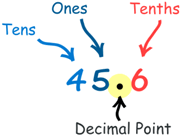
Here is the number "forty-five and six-tenths" written as a decimal number: The decimal point goes between Ones and Tenths.

First, let's have an example:

Here is the number "forty-five and six-tenths" written as a decimal number:

The decimal point goes between Ones and Tenths.

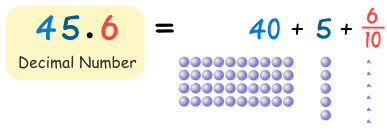
45.6 has 4 Tens, 5 Ones and 6 Tenths, like this:


convert decimal numbers to binary examples


Method 1 Short Division by Two with Remainder
  1. Set up the problem. For this example, let's convert the decimal number 15610 to binary. ...
  2. Divide. ...
  3. Continue to divide until you reach 0. ...
  4. Write out the new, binary number.


What are the difference between Binary and Decimal


Decimal Numbers Binary Numbers
Decimal numbers consist of combination ten digits or values from 0 to 9 (0,1,2,3,4,5,6,7,8,9).                   Binary numbers are formed by combination of only 2 digits or values 0 (zero) and 1 (one).
The radix for decimal number is 10 i.e all the digits in a decimal number are expressed in terms of powers of 10.The radix for binary number is 2 i.e all the digits or values in a binary number are expressed in terms of powers of 2.
Example of  decimal number : 25 (Twenty Five)Example of Binary number : 11001 (Twenty Five)
Applications 
  • Most common and used in everyday life.
  • Used in all Financial transactions, banking operations.
Applications 
  • Most widely used for performing arithmetic and logical operations in all digital circuits


game

INPUT DEVICES


Following are few of the important input devices which are used in a computer:


  1. Keyboard
  2. Mouse
  3. Joy Stick
  4. Light pen
  5. Track Ball
  6. Scanner
  7. Graphic Tablet
  8. Microphone
  9. Magnetic Ink Card Reader(MICR)
  10. Optical Character Reader(OCR)
  11. Bar Code Reader
  12. Optical Mark Reader(OMR)
  13. Keyboard


Keyboard

Keyboard is the most common and very popular input device which helps in inputting data to the computer. The layout of the keyboard is like that of traditional typewriter, although there are some additional keys provided for performing additional functions.

Keyboards are of two sizes 84 keys or 101/102 keys, but now keyboards with 104 keys or 108 keys are also available for Windows and Internet.

The keys on the keyboard are as follows:

Typing Keys -These keys include the letter keys (A-Z) and digit keys (0-9) which generally give same layout as that of typewriters.

Numeric Keypad - It is used to enter numeric data or cursor movement. Generally, it consists of a set of 17 keys that are laid out in the same configuration used by most adding machines and calculators.

Function Keys The twelve function keys are present on the keyboard which are arranged in a row at the top of the keyboard. Each function key has unique meaning and is used for some specific purpose.

Control keys - These keys provide cursor and screen control. It includes four directional arrow keys. Control keys also include Home, End, Insert, Delete, Page Up, Page Down, Control(Ctrl), Alternate(Alt), Escape(Esc).

Special Purpose Keys - Keyboard also contains some special purpose keys such as Enter, Shift, Caps Lock, Num Lock, Space bar, Tab, and Print Screen.
Keyboard


mouse

Mouse is most popular pointing device. It is a very famous cursor-control device having a small palm size box with a round ball at its base which senses the movement of mouse and sends corresponding signals to CPU when the mouse buttons are pressed.

Generally it has two buttons called left and right button and a wheel is present between the buttons. Mouse can be used to control the position of cursor on screen, but it cannot be used to enter text into the computer.

Advantages

  • Easy to use
  • Not very expensive
  • Moves the cursor faster than the arrow keys of keyboard.


Joystick

Joystick is also a pointing device which is used to move cursor position on a monitor screen. It is a stick having a spherical ball at its both lower and upper ends. The lower spherical ball moves in a socket. The joystick can be moved in all four directions.

The function of joystick is similar to that of a mouse. It is mainly used in Computer Aided Designing(CAD) and playing computer games.


Light pen

Light pen is a pointing device which is similar to a pen. It is used to select a displayed menu item or draw pictures on the monitor screen. It consists of a photocell and an optical system placed in a small tube. When the tip of a light pen is moved over the monitor screen and pen button is pressed, its photocell sensing element detects the screen location and sends the corresponding signal to the CPU.


Track ball

Track ball is an input device that is mostly used in notebook or laptop computer, instead of a mouse. This is a ball which is half inserted and by moving fingers on ball, pointer can be moved. Since the whole device is not moved, a track ball requires less space than a mouse. A track ball comes in various shapes like a ball, a button and a square.


Scanner

Scanner is an input device which works more like a photocopy machine. It is used when some information is available on a paper and it is to be transferred to the hard disc of the computer for further manipulation. Scanner captures images from the source which are then converted into the digital form that can be stored on the disc. These images can be edited before they are printed.


Digitizer

Digitizer is an input device which converts analog information into digital form. Digitizer can convert a signal from the television or camera into a series of numbers that could be stored in a computer. They can be used by the computer to create a picture of whatever the camera had been pointed at. Digitizer is also known as Tablet or Graphics Tablet because it converts graphics and pictorial data into binary inputs. A graphic tablet as digitizer is used for doing fine works of drawing and image manipulation applications.


Microphone

Microphone is an input device to input sound that is then stored in digital form. The microphone is used for various applications like adding sound to a multimedia presentation or for mixing music.


Magnetic Ink Card Reader(MICR)

MICR input device is generally used in banks because of a large number of cheques to be processed every day. The bank's code number and cheque number are printed on the cheques with a special type of ink that contains particles of magnetic material that are machine readable. This reading process is called Magnetic Ink Character Recognition (MICR). The main advantages of MICR is that it is fast and less error prone.


Optical Character Reader(OCR)

OCR is an input device used to read a printed text. OCR scans text optically character by character, converts them into a machine readable code and stores the text on the system memory.

Bar Code Readers

Bar Code Reader is a device used for reading bar coded data (data in form of light and dark lines). Bar coded data is generally used in labelling goods, numbering the books etc. It may be a hand held scanner or may be embedded in a stationary scanner. Bar Code Reader scans a bar code image, converts it into an alphanumeric value which is then fed to the computer to which bar code reader is connected.


Optical Mark Reader(OMR)

OMR is a special type of optical scanner used to recognize the type of mark made by pen or pencil. It is used where one out of a few alternatives is to be selected and marked. It is specially used for checking the answer sheets of examinations having multiple choice questions.


Network Topologies

What is a Topology?

Network topology is the arrangement of the various elements (linksnodes, etc.) of a computer network.Essentially, it is the topological structure of a network and may be depicted physically or logically. Physical topology is the placement of the various components of a network, including device location and cable installation, whilelogical topology illustrates how data flows within a network, regardless of its physical design. Distances between nodes, physical interconnections, transmission rates, or signal types may differ between two networks, yet their topologies may be identical.


Basic Types of Topologies

  • Star Topology
  • Bus Topology 
  • Ring Topology

Star Topology


Alternatively referred to as a star networkstar topology is one of the most common network setups. In this configuration, everynode connects to a central network device, like a hubswitch, or computer. The central network device acts as a server and the peripheral devices act as clients.

Advantages of Star Topology 


  • Centralized management of the network, through the use of the central computer, hub, or switch.
  • Easy to add another computer to the network.
  • If one computer on the network fails, the rest of the network continues to function normally.

Disadvantages of Star Topology 


  • Can have a higher cost to implement, especially when using a switch or router as the central network device.
  • The central network device determines the performance and number of nodes the network can handle.
  • If the central computer, hub, or switch fails, the entire network goes down and all computers are disconnected from the network.


Bus Topology

Alternatively referred to as a line topology, a bus topology is a network setup in which each computer and network device are connected to a single cable orbackbone. The following sections contain both the advantages and disadvantages of using a bus topology with your devices.

Advantages of Bus Topology


  • It works well when you have a small network.
  • Easiest network topology for connecting computers or peripherals in a linear fashion.
  • Requires less cable length than a star topology.

 Disadvantages of Bus Topology


  • Difficult to identify the problems if the whole network goes down.
  • It can be hard to troubleshoot individual device issues.
  • Not great for large networks.

Ring Topology

Alternatively referred to as a ring network, a ring topologyis a computer network configuration where the devices are connected to each other in a circular shape. Each packet is sent around the ring until it reaches its final destination. Ring topologies are used in both local area network (LAN) and wide area network (WAN) setups.

Additional information
In the past, the ring topology was most commonly used in schools, offices, and smaller buildings where networks were smaller. However, today, the ring topology is seldom used, having been switched to another type of network topology for improved performance, stability, or support.

Advantages of ring topology
  • All data flows in one direction, reducing the chance of packet collisions.
  • A network server is not needed to control network connectivity between each workstation.
  • Data can transfer between workstations at high speeds.
  • Additional workstations can be added without impacting performance of the network.
Disadvantages of ring topology
  • All data being transferred over the network must pass through each workstation on the network, which can make it slower than a star topology.
  • The entire network will be impacted if one workstation shuts down.
  • The hardware needed to connect each workstation to the network is more expensive than Ethernet cards and hubs/switches.